Showing posts with label Windows. Show all posts

odrive : Combine all your storage at one place.


odrive brings all your cloud storage apps together in one folder right on your desktop. Just link your Dropbox, Google Drive, Gmail, Box, and OneDrive accounts to odrive and instantly get all your files scattered everywhere in one place!

odrive simplifies access to everything. Get your apps, your photos, and your storage all from one place on your desktop. Easily access multiple accounts from the same storage, too.

Using odrive you can combine all your storage at one place and access it anywhere.

You can combine all these at one place : 
  • Dropbox gives you up to 16GB free. 
  • Google Drive & Gmail give you 15GB.
  • OneDrive gives you 15GB.
  • Box gives you 10GB.

You will get more than 55GB storage.


Download : 

You can download odrive using the link given below. Just click on the download button given below.

 Download odrive
  • Download and Install odrive.
  • Link all your cloud storage accounts.
  • Get all your stuff!


For any queries related, feel free to ask in comments or contact us here.
For more, follow Hackersfall on Facebook , Twitter and G+.

GTA IV Complete Edition Overview.

Grand Theft Auto IV is an action adventure game. This game is published by Rock star games. This is an amazing game and there is lot of things to do in this game. You will never get bored while playing this game.


In this game Grand Theft Auto IV Complete Edition there is one main character. The player can do many things like running, jumping, climbing and swimming. Player can also use different types of weapons. This game has many missions to complete. If you don’t want to complete missions. You can easily do free roaming in the city. and enjoy the game. You will see different real world vehicles in this game. Player can steal these vehicles. and enjoy the drive of every vehicle. There is so much games which based on race like Need For Speed Hot Pursuit, Deadly Race etc. But these are only racing games. with limited cars models. GTA is totally different from racing games. In this game you can enjoy every type of vehicles like Cars, Trucks, Bus, Heavy Bike, Helicopters and boats are also present in this game and player can use them. When the player completes missions he can unlock different parts of city.


Main thing in this game is that this game has no hard and fast rules. Player can play this game on his own choice. Player can destroy the vehicles of police and other forces. Wanted level is shown by green circle on the screen. When the wanted level is full. Player is almost surrounded by police and other forces. Player can do different tactics to destroy them. Player can also use a mobile phone for communication. This game is almost same to Gta San Andreas. Police vehicles are change in this game.

This game has several possible endings depending on player’s choice. Grand Theft Auto IV Complete Edition can also be played in multiplayer mode as well as single player mode. You will experience all these features after Grand Theft Auto IV Complete Edition Free Download.

Grand Theft Auto IV Complete Edition Features.
 
Below are the main features of Grand Theft Auto IV Complete Edition.

  • An open world action adventure game.
  • Published by Rock star games.
  • Player can do many things.
  • Player can steal the cars.
  • Different type of weapons.
  • Several interesting missions.
  • Player can also do free roaming.
  • Real world vehicles, helicopters and boats.
  • No hard and fast rules.
  • A mobile phone for communication.
  • Single and multiplayer mode is available.

Grand Theft Auto IV Complete Edition System Requirements :-

Before you start Grand Theft Auto IV Complete Edition Free Download make sure your PC meets Minimum system requirements.

Operating System: Windows Vista/ Windows 7/ Windows 8 and 8.1
CPU: Core 2 Duo
RAM: 1 GB
Hard Disk: 16 GB


Grand Theft Auto IV Complete Edition Free Download

Click below on the link to start Grand Theft Auto IV Complete Edition Free Download.


It is full and complete game. Just download and start playing it. We have provided direct link full setup of game.

You can comment below for any query or contact us on Contact us page.
For more news, follow us on Facebook , Twitter and G+.


Far Cry 4 Overview

Far Cry 4 is an open world action-adventure first-person shooter video game developed by Ubisoft Montreal and published by Ubisoft for the PlayStation 3, PlayStation 4, Xbox 360, Xbox One video game consoles, and Microsoft Windows.


The sequel to the 2012 video game Far Cry 3, it is the fourth installment in the Far Cry series. The game was released in North America, Australia, and Europe on November 18, 2014. It will also be released on January 22, 2015 in Japan.


About Far Cry 4:

Step into a vast, unknowable land once again in this fourth game in the Far Cry franchise. Players find themselves in Kyrat, a wild region of the Himalayas struggling under the regime of a despotic self-appointed king. Using a vast array of weapons, vehicles and animals, players will write their own story across an exotic open-world landscape. Built from the legendary DNA of its award-winning predecessor, Far Cry 4 delivers the most expansive and immersive Far Cry experience ever in an entirely new and massive open world with a new weapons, vehicles, wildlife and more.

In Far Cry 4, you’ll conquer fortress outposts from the back of a six-ton elephant and take to the skies as you rain down explosives from the seat of your gyrocopter. The vertical landscape of the Himalayas isn’t just a pretty backdrop, but a playground that encourages the player to fight, hunt and explore, grappling up cliffs or launching into the air, plummeting to the valley below in a controlled free fall with your wing suit. You’ll carry with you a truly unique arsenal of weaponry that lets you play your way, whether it’s sniping, sneaking or all-out assault. When all else fails, animals can be your biggest allies or your greatest danger, as Kyrat’s wilderness delivers on the promise of a true open world anecdote factory.

System Requirements:-
Minimum:

Supported OS: Windows 7 SP1, Windows 8/8.1 (64-bit versions only)
Processor: Intel Core i5-750 @ 2.6 GHz or AMD Phenom II X4 955 @ 3.2 GHz
Memory: 4GB
Video Card: Nvidia GeForce GTX 460 or AMD Radeon HD5850 (1GB VRAM)
Direct X: Version 11
Hard Drive: 30 GB available space
Sound Card: DirectX 9.0c compatible sound card with latest drivers

Optimal:

Supported OS: MS Windows 7 SP1, MS Windows 8/8.1 (64-bit versions only)
Processor: Intel Core i5-2400S @ 2.5 GHz or AMD FX-8350 @ 4.0 GHz or better
Memory: 8GB
Video Card: Nvidia GeForce GTX 680 or AMD Radeon R9 290X or better (2GB VRAM)
Direct X: Version 11
Hard Drive: 30 GB available space
Sound Card: DirectX 9.0c compatible sound card with latest drivers

You can comment below for any query or contact us on Contact us page.
For more news, follow us on Facebook , Twitter and G+.

Need For Speed Rivals PC game

Need For Speed Rivals is an exciting racing video game by EA sports.


You have different game modes in which you can play NFS rivals. Play as a lone-wolf racer or a team-based cop as you speed through the streets of your country, collecting up speed points and using to earn even greater rewards. You can switch from cop to racer at any time to succeed in every race and every challenge.


Winning races means customising your car with the latest upgrades, and personalising it with snazzy paintjobs, rims and more - and you can even save multiple vehicles suited for every situation. You can also connect with your friends and play with them in this game.


Features :-

1. Pursuit and Evasion Tech to arm yourself against your opponents.
2. New all dive system is also provided in the game.
3. Featuring two careers as cop and as racer.
4. Excellent detailed graphics.
5. Exceptional weather system.


System Requirements :-
  • OS: Windows XP, Windows Vista/ Windows 7/ Windows 8 and 8.1
  • CPU: Intel 2.4 GHz, Core 2 Duo or higher.
  • RAM: 4GB or higher.
  • HDD : 15 GB.
If you have any queries related to any of our post, you can comment below or contact us here.
For more games, follow us on Facebook , Twitter and G+.

Netcut : Disable WiFi of Other users on same network

Few days back I shared an Android app WifiKill : Disable WIFI of other users on same network. But this time I am gonna share an awesome app for windows i.e Netcut ( known as WifiKill for PC ) that is used for the same thing as WifiKill. Unlike WifiKill it does not requires root, It can be Installed and operated normally on windows.


Note:
This App is for educational purpose only.

  • Netcut is a wireless network analyzer tool.
  • You can get MAC addresses of all the devices connected to your Wireless LAN. 
  • You can find the name of all connected devices, and their IP address.
  • You can even change their MAC address.
  • The most interesting part is that you can Disable the Internet connectivity of any device connected to the same wifi network.

 Download Netcut

Download and then Install Netcut like you install a normal software. 

After completing the installation, it will ask to install  winPcap(necessary). If not, then manually install the winPcap 


After installation Finish it and enjoy....!!!!

Note : 

You will not be able to control the devices which have Anti- netcut (Netcut defender) installed and running.

If you have any queries related to any of our post, you can comment below or contact us here.
We will be happy to assist you.
For more tips and tricks, follow us on Facebook , Twitter andG+.

Intel's HDMI Stick turns TV into a Windows Desktop.


Intel's $150 HDMI Stick Turns Any TV Into a Windows Desktop

This is the Intel Compute Stick, a humble HDMI dongle that gives a full desktop computer experience. It's not a particularly powerful one — you get a quad-core 1.33GHz Intel Atom processor, 2GB of RAM, and 32GB of solid state storage—but it does have Wi-Fi, Bluetooth, and both a full-size USB port and a microSD card slot for expandability.

The Compute Stick uses Intel's Bay Trail Atom Z3735F quad-core processor and includes Bluetooth 4.0, 2.4Ghz 802.11n wireless and a single USB port. It also includes a microSD expansion slot for more storage.

In terms of connectivity the Intel Compute Stick has a male HDMI port on one end and a microUSB for power. Intel is working on an improved verison that will draw its power from the HDMI port itself, saving you a cable.

The pocketable computer will be available this March. Future versions will update the chipset from Bay Trail to the new Cherry Trail and maybe even Core M.

A Linux version of the Compute Stick is also available for $89. It comes with 8GB of storage and 1GB of RAM.

If you have any queries related to any of our post , you can comment below or contact us here.
For more news, follow us on Facebook , Twitter and G+.

How to save a whole webpage as PDF in Chrome.

Sometimes we may need to save the web page for future reference so that we can access it when are offline or we may need to say that page in order to print it later.

In thus tutorial I am going to share a very simple method to save the complete webpage as PDF in Google Chrome without any use of software or any chrome extension.

Given below are the steps to save a webpage as PDF :

1. Open the webpage you want to save .


2. After the web page is opened ,press "CTRL+P" from your keyboard.
The print pop up window will open.
Now you need to change the Destination and Click on change.


3. Now select option save as PDF.


4. Now click on SAVE to save this webpage as PDF.


After this, click on Save and whole of the webpage will be saved as PDF. Now You can read it or print it offline.


If you have any queries related to any of our post , you can comment below or contact us here.

For more, follow us on Facebook , Twitter and G+.
Keep visiting Hackersfall.

Easiest ways to Download a youtube video.

In today's world , everyone uses youtube . Hence there is a need for downloading your favorite video which can be stored in our storage to watch offline . 

There are many ways to download a youtube video . These are some of the best ways to download a video from youtube :

1. Internet Downloader Manager  ( IDM ) .

It is the best and the easiest way to download any video from internet . It automatically provides a link to download the video you are watching. For IDM to work , you just need to follow these easy steps :-

1. Download and install latest version of IDM . Download here . 
2. Enable its Extension from your browser . For eg. In Google Chrome ...


3. Restart your browser.
4.  It automatically provides a link to download the video you are watching.

2. 4k Downloader.

This is also a very easy way to download a youtube video. In this method you are just needed to follow these easy steps :-

1. First download and install 4k downloader on your pc . Download it here.
2. Copy the URL of the video you want to download.
3. Click on "Paste URL" option in the 4k downloader .


4. It'll provide you with a no. of options for downloading your selected video. Each option is for different format.
5. Click on any format and your video will start downloading.


3. Adding "ss" in your URL .

This is the Simplest , easiest and shortest way to download a youtube video. In this step you just add ss in your URL as shown in the pic.


After entering 'ss' , you will be redirected to a different page which automatically enables downloading in your browser.

Thanks for your support. If you have any queries , contact us here.

How to make an invisible folder

How to make an invisible folder without use of any Software.


@Hackersfall

Hey guys, Today in this post I will show you how to make a folder invisible without hiding it ad without use of any third party tool.
Making a folder invisible is very simple, you just need to follow these given steps :

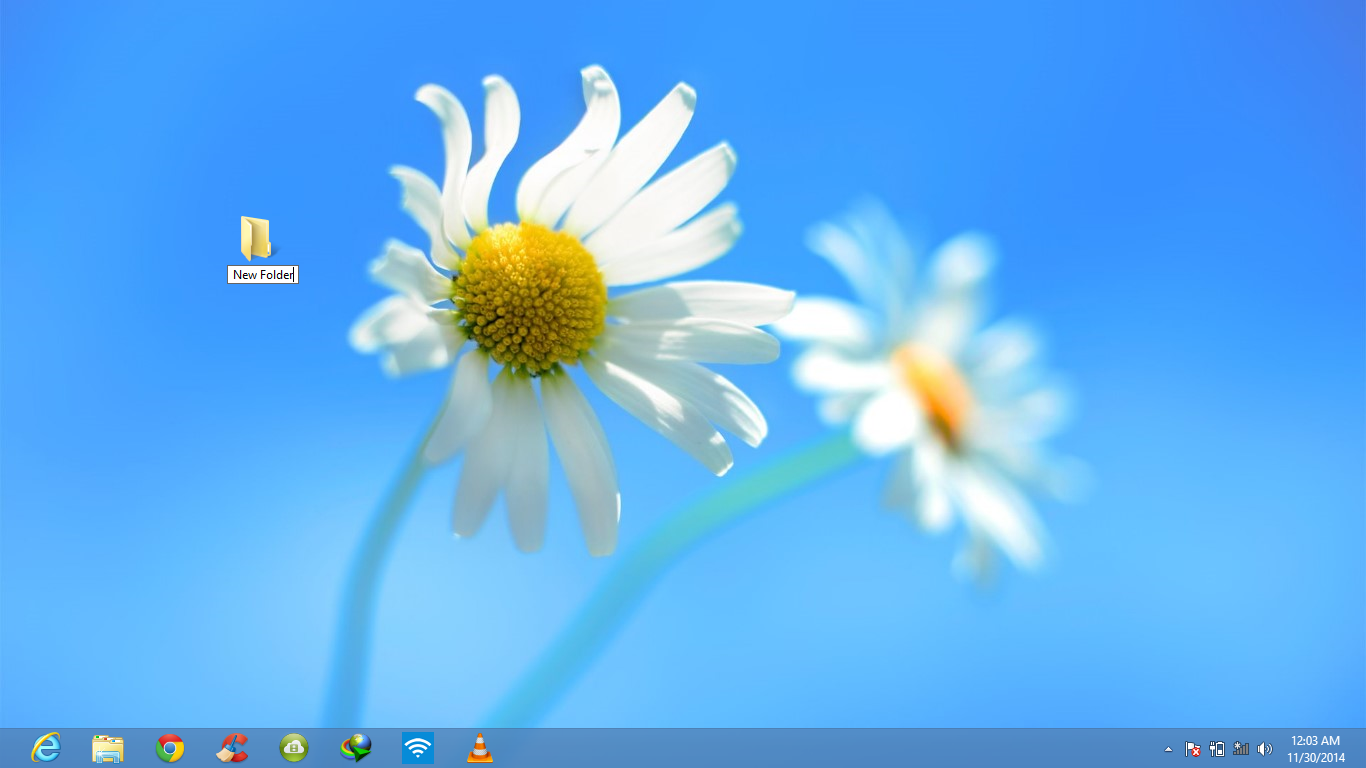
Step 1 : Create a new folder anywhere, Lets create a folder on desktop.
Right click on it and select rename.


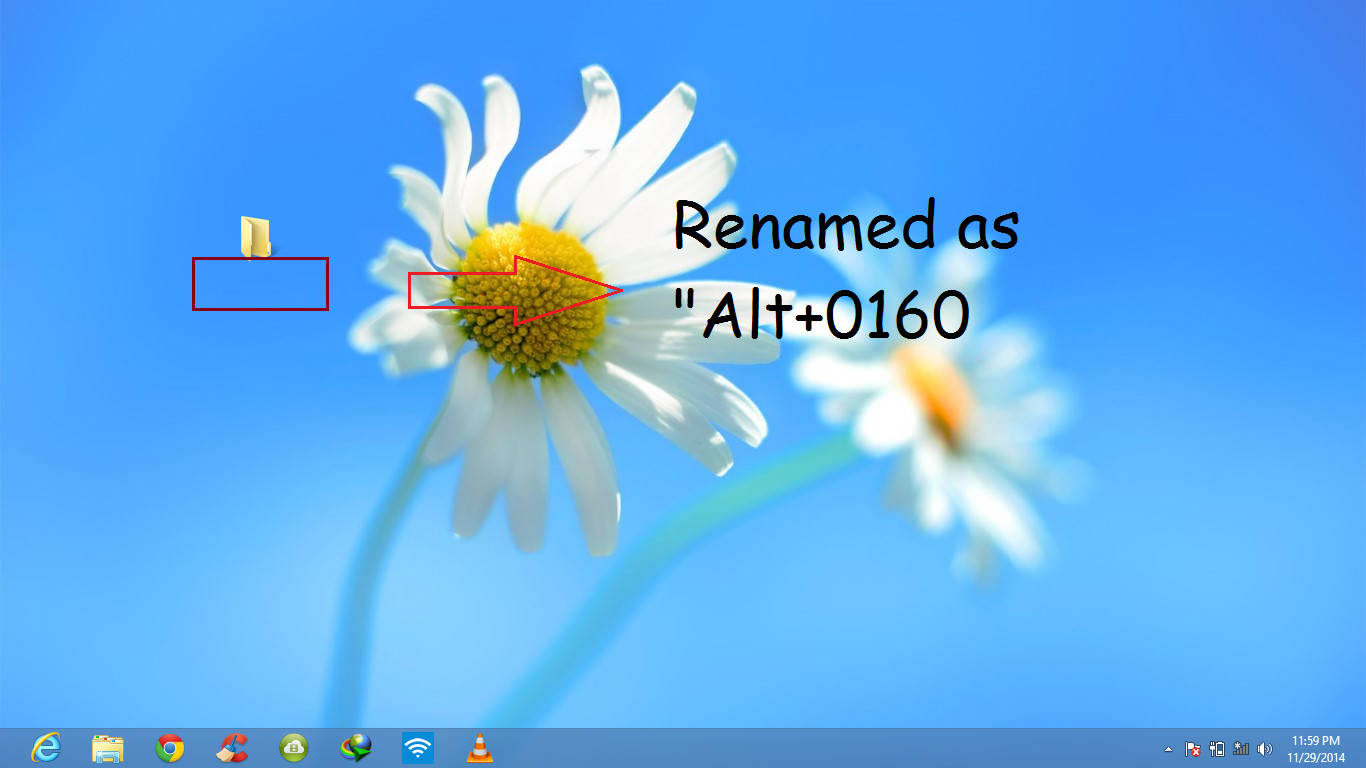
Step 2 : Rename it as "Alt + 0160" (excluding the inverted commas) i.e. type in 0160 along with pressing the Alt key.


After pressing enter , you will find that the folder is renamed with a blank space.

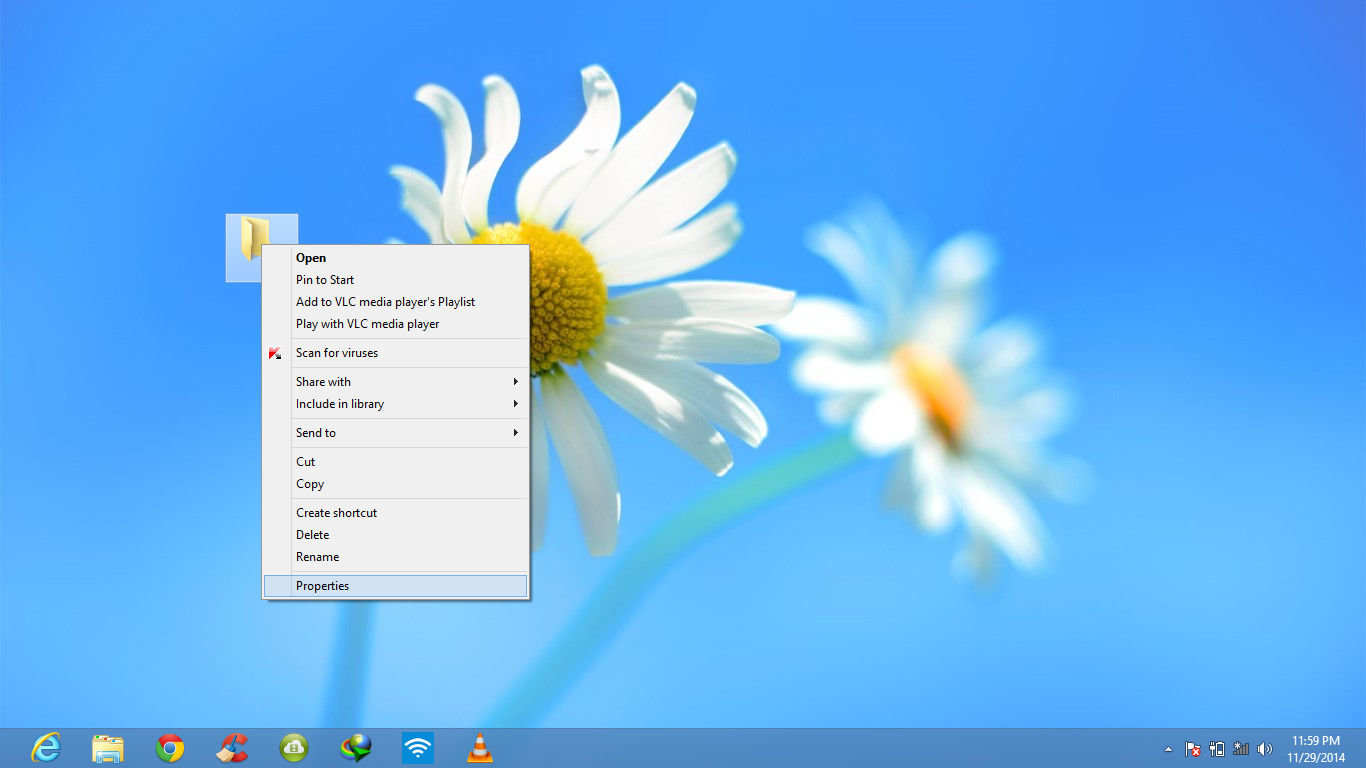
Step 3 : Right Click on the folder and select "Properties".


Step 4 : Go to "Customize" menu and then to 'change icon' option.Then select any blank folder icon.


You'll see that an invisible folder is created.


Which only appears only when you try to select the whole screen.


You are all done. You made an invisible folder.
Enjoy.
If you have any problem please mention in comments. We will be happy to assist you.


For more tips and tricks , News and more, follow us on Facebook , Twitter and G+.

Windows 10 Technical Preview : Download

Windows 10 technical preview : Download, Overview.

Microsoft was planning to launch Windows 9 but instead of windows 9 Microsoft announced the next version of Windows operating system : Windows 10 know as " Technical Preview". Windows 10 Technical Preview is now available for download to the general public, and it's absolutely free. Downloading Links are given below.


What's NEW:

  • In windows 10 Technical Preview Microsoft is bringing back a few features of Windows 7, too, including a redesigned start menu that combines the basic Windows 7 menu with the tiles of the Windows 8 start screen.


  • Windows 8 Metro apps can now also be open in a windowed mode on the desktop, so instead of full screen mode by default and you can use a “modern” Windows 8 side by side with a standard Windows desktop app.
  • Windows 10 will also allow users to work with multiple desktops.
  • The Start menu returns. After a few years it may be considered that the Metro-style Start screen was just good for mouse-and-keyboard use as touchscreen use, but Microsoft has finally backed down. Windows 10 will have a Start menu on the Desktop.
  • Virtual desktops.
  • A new Task View button.


How To Install Windows 10 Technical Preview

Product key: NKJFK-GPHP7-G8C3J-P6JXR-HQRJR
  • When the download is complete, make a USB or DVD of these files.
  • Now just run "setup.exe" and follow the steps.
Download Links :
English 64-bit (x64) - Click here

English 32-bit (x86) - Click here

Be sure your computer accomplishes the minimum requirements:


Processor: 1 gigahertz (GHz) or faster
RAM: 1 gigabyte (GB) (32-bit) or 2 GB (64-bit)
Free hard disk space: 16 GB
Graphics card: Microsoft DirectX 9 graphics device with WDDM driver
A Microsoft account and Internet access

Windows 10 Technical Preview


Windows 8.1


What's new in Windows 8.1?


Windows 8.1 is a version of the Windows NT operating system and an upgrade for Windows 8. First unveiled and released as a public beta in June 2013, it was released to manufacturing on August 27, 2013, and reached general availability on October 17, 2013, almost a year after the retail release of its predecessor.
Some of the features of window 8.1 are :-

The Start button has returned to the desktop—tap or click to get to Start. If you prefer, you can now go straight to the desktop when you sign in, or use the same background for both your desktop and Start. And see all your apps at once in the new all-apps view.

With bing smart search you can search once and see everything—from the web, or the settings, files and apps on your PC—and act on search results right away. Play a song, call a friend, open an app, or get to your favourite site. Just search and do. (Certain features unavailable in some regions.)

Chat while gaming, shop while watching, or work while listening. Whether you’re on a PC or a tablet, you can always multitask. Depending on screen size, you can see up to four apps at once and you can switch between them easily.

In the redesigned Windows Store, you'll discover apps built only for Windows 8.1, new community favourites, and personalised recommendations. This update also gives you some great new built-in apps like Reading List and Food + Drink. And now you'll be able to install your apps on all your tablets and PCs running Windows 8.1.

On your Start screen, there are more tile sizes, more colour options, and animated backgrounds. On your lock screen, you can see a slide show of your favourite photos and take photos—all without unlocking your PC.

On select devices you'll now see a power button on the upper-right corner of your Start screen so you can more quickly and easily shut down (select PCs don't have this power button). You'll also see a search button on the Start screen, next to the power button.

You can download window 8.1 by clicking on the link given below..
Download

For any help related to any of the article you can comment in comment box..

Windows 9 : Release date, News, Features.


Window 9 : Release date, News , Features , Images.


With the Windows 9 release date, here are the top features we want to see ::-

Windows 9, also known as “Threshold”, is expected to arrive sometime in 2015.

Windows 8 has had plenty of detractors since it arrived back in 2012, with the unpopular disappearance of the start button and Metro menu view confusing users at best and alienating them at worst.

It was rumoured that Windows 9 would see a release date as soon as April 2015, but a third update to Windows 8 in the same month means that we will likely have to wait until later in the year.


Ahead of this date, we list the feature we hope Microsoft includes.

1. Lower price :-

Microsoft needs a carrot to dangle in front of consumers and businesses to convince them to invest in Windows 9 machines. The firm might even have to go so far as to offer users the chance to upgrade to the next-iteration of Windows for free.
Reducing the cost of upgrading will help people finally part with Windows XP - the aged operating system that entered end of life in April 2014.


2. Better Battery Life :-
Intel’s 2013 Haswell chips provided a big jump in battery life, which can be seen in the latest crop of Ultrabooks. Windows machines have long been known to burn through battery power quicker than their Mac OS X counterparts.
Microsoft needs to better implement power saving features into Windows 9 or risk being left further behind next-gen Mac products.


3. Desktop-Only Mode :-
The Metro UI has alienated many loyal Windows users and the firm is going to have to work hard to appease them. Windows 8.1 went some way towards making things better with the option to boot straight to desktop.

But we want Windows 9 to take this a step further. We want the option to switch Metro off. So when you turn on desktop-only mode, this means images should open in Windows Gallery, not the Metro Preview app.

With Windows 9 for mobile devices, Microsoft is reportedly planning to ditch the desktop entirely, and rumours suggest that PCs running the OS may be sold with the Metro view disabled as a default.

Desktop-only mode would let users work in peace and placate some of Microsoft’s critics, while allowing the company to keep experimenting with Metro for consumers.

The Charms bar - another unpopular element of Windows 8's redesign - is also rumoured to have been dropped, with the search, share, devices and settings options previously housed there moving to new title bars on modern Windows 9 apps.


4. Virtual desktops for improved productivity :-

OS X and Linux have had virtual desktops for years. They allow you to keep multiple sets of windows open on one computer, to mprove productivity when juggling multiple projects.

Microsoft has announced that virtual desktops will indeed be part of Windows 9, allowing users to enjoy multiple desktop displays with individual settings, making it easier to seperate work and home activities on the same device.

5. Bring back the real Start button
It’s amazing how so many people can miss such a small feature. Microsoft gave into popular demand when it put a Start button in Windows 8.1, but this just brings you back to the Start screen.

It was rumoured for some time the Start Button would return with Windows 8.1 Update 2, but sources claim it has been delayed until June 2015 when it is thought Windows 9 will also arrive.

When it does finally see the light of day, the new-look Start Menu will reportedly include both the classic layout of previous iterations and a new Metro panel with live tiles for Windows Store apps. A mock-up of the menu was shown at April’s Build conference.

6. Over-the-air system recovery :-

Microsoft could also make it easier to restore Windows in the event of a malfunction. Mac devices can reinstall OS X by simply downloading files from the internet.

A similar system would make it easier to recover Windows computers, as it is much simpler than digging through BIOS boot settings and trying to find your recovery USB.

Keeping so many system-specific files would be difficult, but it’s possible. Microsoft could convince hardware manufacturers to contribute the necessary files so users could recover their systems over-the-air.

7. Better display scaling :-

Windows has not been able to cope with the high-resolution devices manufacturers have started pumping out. As screen resolutions climb north of 1920 x 1080, programs such as Adobe Premiere and Vegas Pro can be rendered unusable in some cases as icons can appear tiny and pixellated.

How to geek put up a useful guide explaining how to change the compatibility settings for troublesome Windows apps in order to make the text readable again, but this shouldn’t even be necessary.

Microsoft needs to add better support for Retina-quality displays to make sure the new version of its OS still looks good on devices like the Surface Pro 2.

8. Improved anti-virus :-

Windows is a primary target for viruses, if only by virtue of its dominant market share. Redmond’s OS attracts the lion’s share of malware, while OS X and Linux aren’t as vulnerable.

Microsoft releases regular security patches and has built Microsoft Security Essentials into Windows 8 - but this has been critically panned. In Dennis pPublishing tests, it missed 39 per cent of malware thrown at it.

We might see things improve with Windows 9 as Intel has rebranded the McAfee software suite and could provide comprehensive protection. But Microsoft has to up its game too.


Powered by Blogger.

Follow Us On Twitter

Contact Form

Name

Email *

Message *


© 2013 HackersFall. All rights resevered. Designed by Templateism

Back To Top