How to Root your Android Device with just one click.

How to Root your Android with just one click.


Now you can root your Android device without Computer, just using FRAMAROOT.

Now you can root your android device without PC in just one click. This app has several exploits including Gandalf, Boromir, Pippin, Legolas, Sam, Frodo, Aragorn and Gimli.

You can install Superuser and SU binary on phone or tablet from android version 2.x to 4.x. You can check List of compatible devices here on Framaroot. Unroot your device is also very simple, just use unroot option in framaroot application.

How to install:

1. Download Framaroot here.

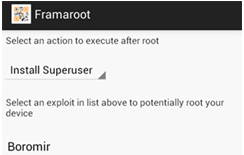
2. Run, choose Superuser or SuperSU

3. Select Boromir or another character

4. You will see :-)

5. Reboot device

6. You are all done.. Rooting device Successful.


!! Important !!

Rooting with this application void warranty on your device.

If you have any queries related to any of our post, you can comment below or contact us here.
For more tips and tricks , News and more, follow us on Facebook , Twitter and G+.
Keep visiting Hackersfall.

How to Post an upside down status on Facebook.

How to Post an upside down status on Facebook or How to Flip text.

In this post I will tell you , How to flip text or make it UPSIDE DOWN.


To Flip the text you just have to follow these simple steps give below : 

1. Open Any of your browser and go to the website "www.Fliptext.org".
2. Write text in the first box you wanna flip.

3. Now in the second box you will see the Flipped text.

Copy it and you can paste it anywhere like you can post a status or change your Facebook name also you can change your Drives name.

Hiding Hard Disk Drives without any software.

Hiding Hard Disk Drives without any software.

Sometimes you may want to hide your hard drives so that no one can access your personal data. In this post I will tell you how to hide the hard disk drives without any software by just following some simple steps.

Just follow these easy steps to hide the drives .

Step 1:- First type gpedit.msc on run and press enter.


Step 2:- Go to second option in User Configuration and expand "AdministrativeTemplates".....then Expand "Windows Components".....then Click On "Windows Explorer"


Step 3:- After Clicking on Windows Explorer check on your right there is an option "Hide These Specified drives in My Computer"

Step 4:- Open It and Select Enable, by default it is in "not Configured" Mode.


Step 5:- Choose the Drive You want to hide under "Pick one of the following combinations"....If you want to hide all just choose "Restrict all drives"....Then click Apply then Ok.

** After Ok your Selected hard drives will be hidden.

To Unhide Your Hidden Drives:-

Do same upto 3rd Step and select "Do not restrict Drives" then apply and check the "not Configure" click Ok

And You are done....!! Enjoy ...!!

NOTE: gpedit.msc may not work in windows 8.

How to Control other's mobile phones with Bluetooth.

Hello guys Today I am sharing a very interesting trick that will tell you how to hack anyone's phone using Bluetooth.


You must have seen in movies that a HACKER accessing mobile phones to steal their important data. Bluetooth hacking is the most popular way to hack or to steal data from any phone.


There are lot of tools and softwares available on internet that can be used to hack any phone. 


One of the most popular ways to transfer data between two mobile devices, in range, is via Bluetooth. But Bluetooth just like any other wireless network is prone to attackers. Bluetooth hacking could be classified into the following ways.
  • BlueJacking
  • BlueSnarfing
  • BlueBugging
In this post I have outlined only some Bluetooth hacking software.

1. Bluescanner :

The first thing one would need in bluetooth hacking, is to identify all the devices ahve their blutooth turned on. Bluescanner is a tool for windows OS , which help in discovering the Bluetooth devices as well as tries to get all the information for a newly discovered device.


2. Super Bluetooth Hack

This is one of the best tool used in hacking and is used to read information and controlling any phone with remote cell phone via Bluetooth.The Phone call list and SMS can be stored in the HTML type. In addition, it can also show the information about the battery, Sim network and many more.

If you want to download the software (Super Bluetooth Hack) simply download it and use it. It is quite easy to use. Follow these steps to install SBH(Super Bluetooth hack) directly to your phone :

1.Go to m.brothersoft.com.
2.Find Quick Download Page link at the bottom of the page.
3.Enter this Code: 127249
4. And your download will start Automatically.


3. BTbrowser

It is a J2ME mobile application which offers the same functionality similar to that BlueScanner.With this tool you can the browse and explore files. This application works on phones , which support JSR-82 such as Nokia 6600 and Sony Ericssion P900.  Download

4. BTCrawler

The BT Crawler is a device scanner for window Based mobiles. It can also perform other bluetooth hacking techniques, namely Bluesnarfing and bluejacking, to vulnerable bluetooth devices in range.
Download BTCrawler  Download.

IMPORTANT

It’s just for the educational purpose. Use it at your own risk.

If you have any problem regarding this , Please leave your valuable comment below.
For more tips and tricks  follow us on Facebook , Twitter and G+.


Google Drones : A future changing step.

Google Drones : A Future Changing Step.


Google Drones : This is the word coming out of everyone's mouth nowadays. 

This has become a burning issue nowadays that Google is gonna launch self-flying objects named as drones. After amazon , now google is thinking of launching google drones .These Drones are self flying objects and will be able to carry anything upto 5 kg. anywhere on your command.
 Now let us see what will happen in next few years.

Is it gonna be a future changing step or not?

This is the question that is arousing in every person's mind...
The program of launching these drones has been named as 'Project Wing'(as per The Atlantic).
Flight tests were conducted a few days ago in Australia .Google tested its limit by about 150 ft.


Google Drones.                                     Source;Google


Google has been researching on this new technique of  carrying goods from one place to another with the help of a flying object.Drones have fulfilled their requirement. Google has tested its drones on various small objects lately. 
The drones will be able to carry a weight upto about 5 kg. Various explanations of bringing the goods down are also given by google like with a parachute or by strings or by landing the drone itself.

GOOGLE DRONES : VIDEO


Powered by Blogger.

Follow Us On Twitter

Contact Form

Name

Email *

Message *


© 2013 HackersFall. All rights resevered. Designed by Templateism

Back To Top